Agency billing
The Agency plan is one subscription on your agency workspace, billed for each linked client. Each client it covers gets Team features, and your staff work there without using its member seats.
- 4 min
- Agency plan
Screens from October 2026
What the plan includes
The Agency plan is $99 a month for each linked client, with at least one client billed. Prices are in US dollars, and taxes, when they apply, are shown at checkout. It includes:
- Team features in each client workspace: 5 members and 500 AI actions a month
- 10 staff seats and 500 AI actions in your agency workspace
- Agency staff work in client workspaces without using their seats
- Agency answer library and branding on exports
- One monthly bill that follows your linked clients
When agency billing isn't available
Subscribe
Only the agency workspace's owner can subscribe. In its Settings, open Billing and usage. On Free, the Agency plan shows your first bill, such as 2 clients × $99 = $198 billed monthly. Select Choose Agency to pay in Stripe.
If your agency workspace already has Solo or Team, email contact@grantflex.com to change it to Agency.
How the bill follows your clients
- Linking a client adds $99 a month and ending a link removes it. Stripe charges or credits the prorated difference right away.
- When the owner links a client, the bill goes up at once. The client is covered once its prorated charge is paid.
- When an admin links a client, it waits until the owner updates billing. The owner gets a notification, and Clients on your plan on Billing and usage offers a button such as Update billing to 3 clients.
- Clients are covered in the order they were linked, oldest first, up to the number billed.
- A deleted client workspace isn't billed. If it's restored, it's covered again once the owner updates billing.
- A client that pays for its own subscription keeps using it, and Clients shows Client’s own plan. Your bill still counts it as a linked client.
Coverage on the Clients page
| Badge | What it means |
|---|---|
| Covered by your agency plan | Team features, paid on your agency’s bill. |
| Client’s own plan | This client pays for its own subscription. |
| Not covered | On the Free plan. Add a client to your agency plan to cover it. |
| Plan unavailable | Billing details could not be loaded. Try again later. |
| Deleted | The workspace was deleted, so your agency isn't billed for it. Its owner can restore it from the workspace list. |
The Clients total at the top of the page says how many clients your agency plan covers. The owner can select it to open Billing and usage.
What a covered client sees
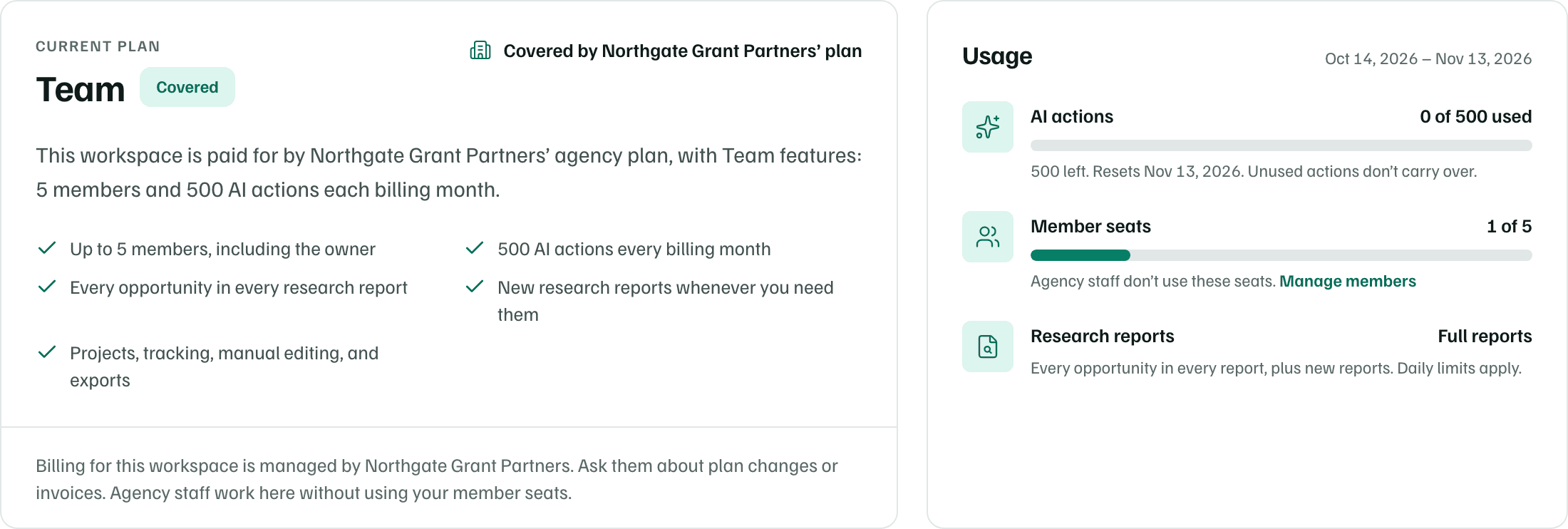
A covered client's Billing and usage shows Team, marked Covered, with 5 members, 500 AI actions each billing month, and every opportunity in its research reports. There's nothing to buy there, so the client asks your agency about plan changes or invoices.
- If your agency's plan won't renew, the client's plan shows when it ends. After that, the client returns to Free unless another plan covers it.
- A payment issue on your agency's plan pauses new AI work in the clients it covers. Saved work, manual editing and exports still work.
Your agency workspace's allowance
The agency workspace has 10 staff seats and 500 AI actions each billing month for its own work, such as building the agency library. Its Usage card shows them, with Client research. Research itself runs in each client's workspace.
Payment methods, invoices and cancelling work as in any workspace. See Billing and usage.