Write a progress report
Each report an award requires has its own page. Note what happened in the period, and GrantFlex can draft the report from your notes and the winning proposal for you to check and send.
- 6 min
- Every plan
- Uses 1 AI action
Screens pending
Uses 1 AI action
In the app:Pipeline, then Awards & reports, then Report
Open a report from its row in Awards & reports, or select Open beside it on the award's page. Reports also appear on the calendar, and in Pipeline's Tasks view under the type Award reports.
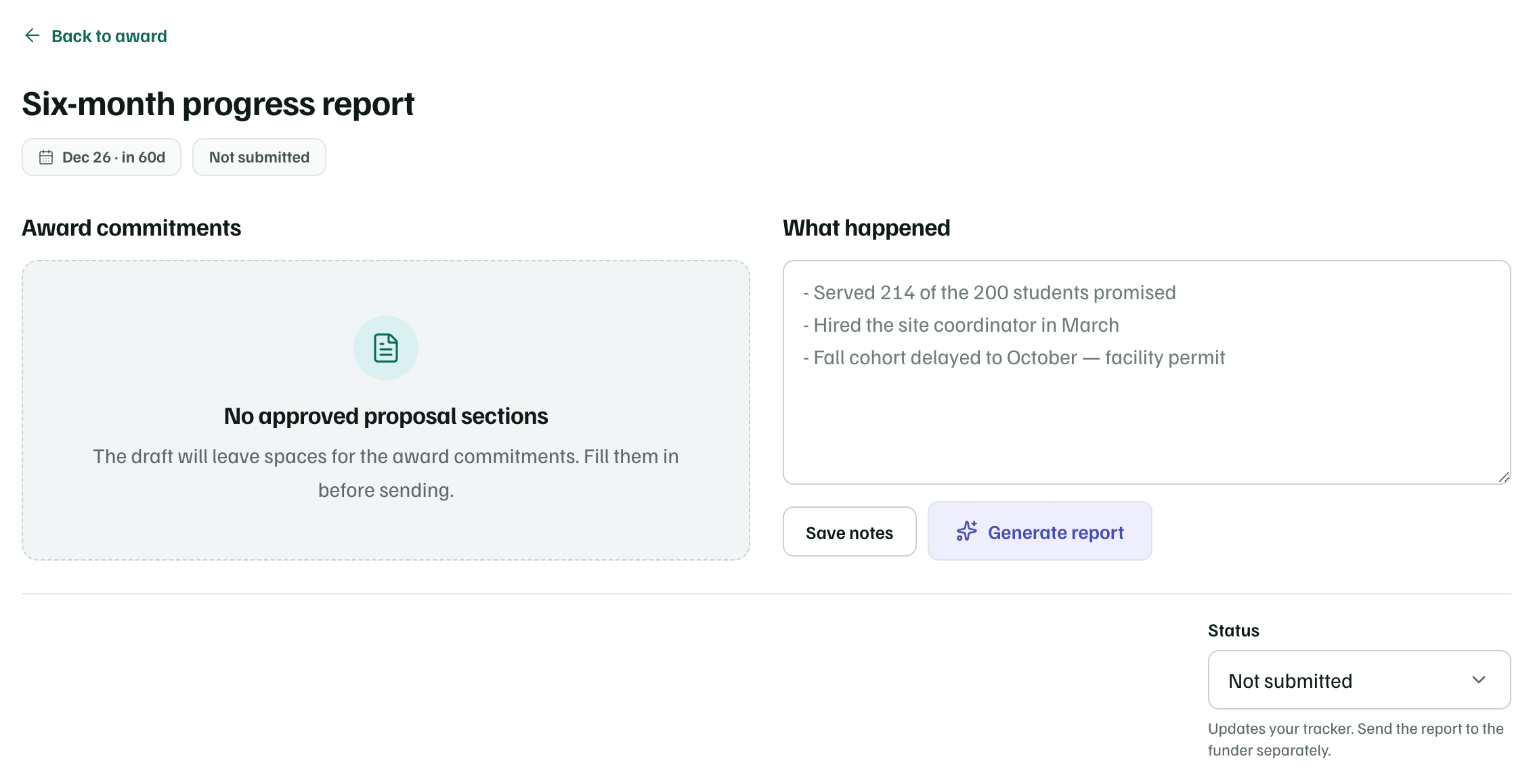
Award commitments
Award commitments lists the approved sections of the proposal that won the award: what you told the funder you'd do. The draft is written against them. If a long proposal won't all fit, the sections left out are named so you can check them yourself.
When the award has no proposal in GrantFlex, or none of its sections are approved, the panel reads No approved proposal sections. The draft then leaves spaces for the commitments, for you to fill in before sending.
What happened
Under What happened, write rough notes on the period: who took part, what you did, what changed and what slipped. Your notes save when you leave the box, or select Save notes. They can run to 20,000 characters.
Generate the report
Select Generate report once you've written a few lines. It saves your notes first and can take up to a minute. The draft appears below as Draft progress report, marked as written by AI, with Copy.
The draft works only from your notes, the approved sections and, once you've extracted the award letter's terms, its rules to follow. Where your notes don't cover a commitment, the draft says it's still in progress or leaves a placeholder for you. Check every figure against your own records. To change the draft, edit your notes and select Regenerate report.
Note
Track the status
The Status menu sets where the report stands. It sits under the draft, or in its place when there's none, so a report you wrote elsewhere can be marked too. It only updates your tracker.
| Status | What it means |
|---|---|
| Not submitted | The report hasn't gone to the funder yet. |
| Awaiting acceptance | You've sent it, and the funder hasn't accepted it yet. |
| Accepted | The funder accepted it. |
- A report marked Awaiting acceptance counts under the same figure in Awards & reports. Its date stops counting down, and its reminders stop.
- Once a report is sent or accepted, its text is the record of what you sent. Set it back to Not submitted to generate it again.