Insights
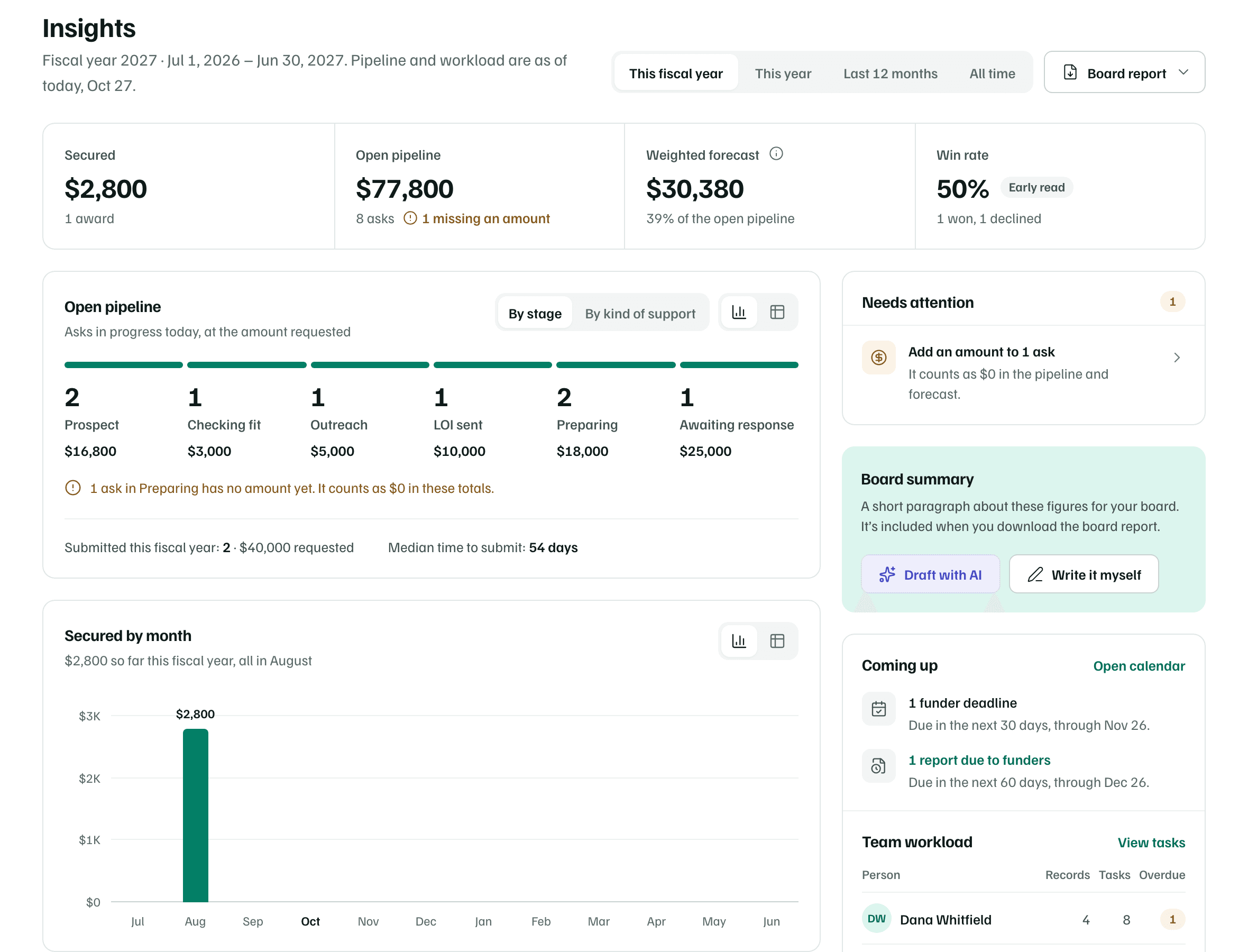
Insights adds up the records you keep in Pipeline: what you've secured, what's in progress, how often funders say yes and what's coming up. Every figure comes from your own records, for the period you choose.
- 7 min
- Every plan
Screens from October 2026
In the app:Insights
Anyone in the workspace can open Insights. Until there's a record to count, it says Insights fill in as you record submissions and awards and offers Open Pipeline.
Choose a period
The switch beside the title sets the period. The line under the title gives its dates.
- This fiscal year: shown, and chosen first, when your organization's Fiscal year ends date is filled in and isn't December 31. It's named for the year it ends in.
- This year: the calendar year.
- Last 12 months: from the first day of the month 11 months ago, through today.
- All time: everything through today.
The period sets what counts as secured, submitted and decided. The open pipeline, Coming up and team workload are always as of today.
Key figures

| Figure | How it's worked out |
|---|---|
| Secured | Awards whose award date falls in the period, added up. The line underneath counts them and, with more than one, gives the average. Awards without an amount are counted and flagged. |
| Open pipeline | Every ask still in progress today, from Prospect to Awaiting response, at the amount requested, or at the target amount until you've asked. An ask with neither counts as $0 and is flagged missing an amount. |
| Weighted forecast | Each open ask's amount times its likelihood, added up. A record uses its stage's default likelihood until someone sets its own. The line underneath gives the forecast as a share of the open pipeline. |
| Win rate | The share of the period's decisions that were awards. A decision is dated when its record was marked Secured or Declined, or by the award date for older awards. With fewer than 5 decisions, it's marked Early read. |
The stage likelihoods are in Pipeline basics. Two more figures sit under the open pipeline chart:
- Submitted: records whose first proposal went to the funder in the period, with the amount requested. A recorded submission dates it, or else the day the record moved to Awaiting response. Letters of inquiry and reports don't count.
- Median time to submit: the middle value of the days from adding each of those records to sending it.
Charts
Each chart has a twin table. Use the chart and table buttons at its top right to switch.
- Open pipeline: the open asks today, By stage or By kind of support, with a count and amount for each. A note says how many asks have no amount yet.
- Secured by month: the money secured in each month of the period. All time shows the last 12 months. Months ahead read Still to come.
Funders
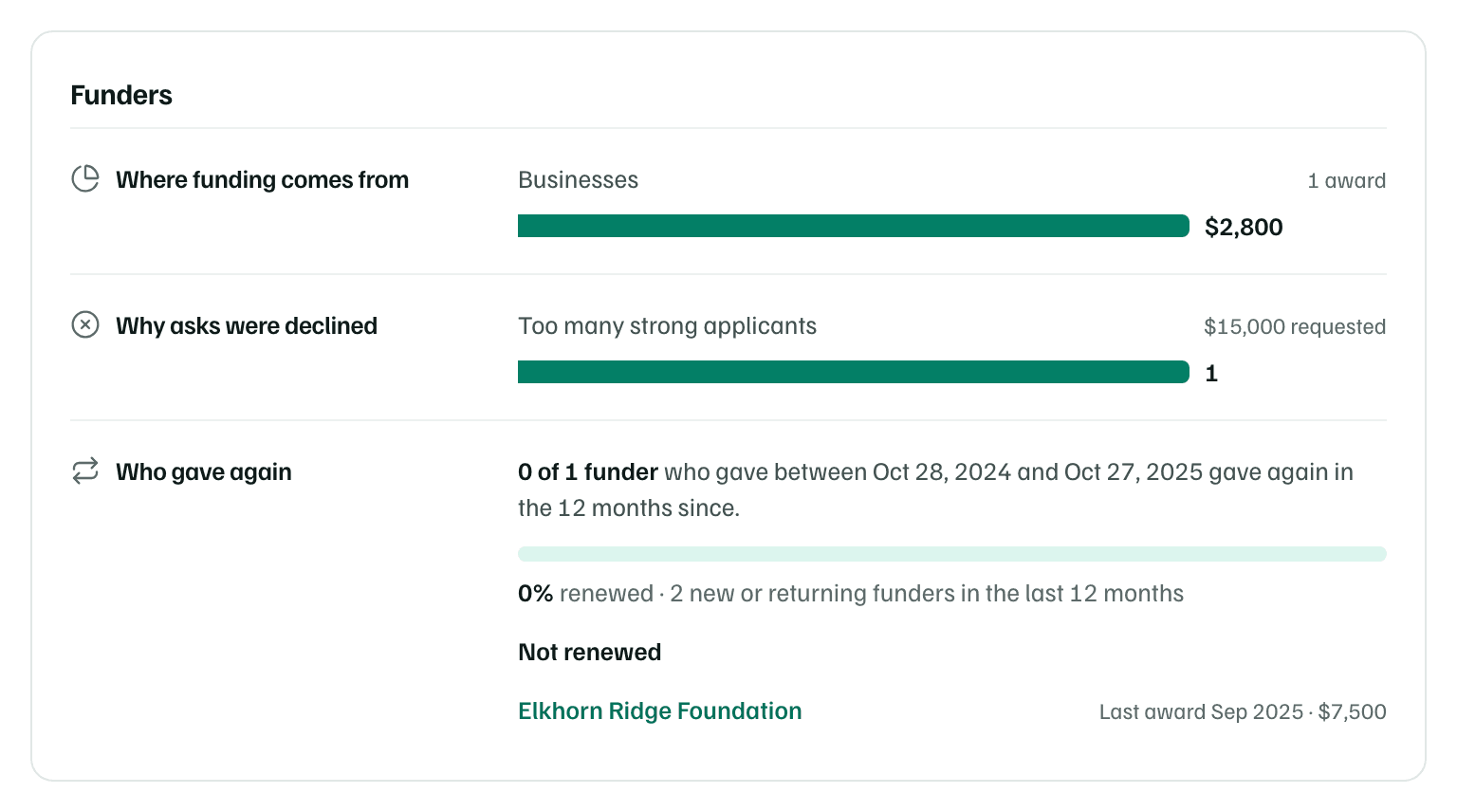
- Where funding comes from: money secured in the period by type of funder, such as Foundations, Community foundations, Businesses, Government, Individuals or Other. The type comes from the funder linked to each award's record. Awards without one show as Type not recorded. Set funder type opens the funder, or the Funders list when there are several.
- Why asks were declined: the period's declines, by the reason chosen when the record was closed.
- Who gave again: of the funders who made an award in the 12 months before the last 12, how many made another since. Not renewed lists those who haven't, largest last award first. Two records for the same funder count once.
Needs attention
The first card on the right lists what makes the figures wrong or shows work slipping. Each item links to where you fix it:
- Funder reports past their due date that are still drafts, such as Send the overdue funder report.
- Overdue tasks nobody owns: Assign the overdue task.
- Open asks without an amount, which count as $0: Add an amount to 1 ask or more.
- Funders with awards in the period but no type: Set a type for 1 funder or more.
When nothing's wrong, it says Nothing needs attention. The Board summary card comes next. See Board summary and board report.
Coming up and team workload
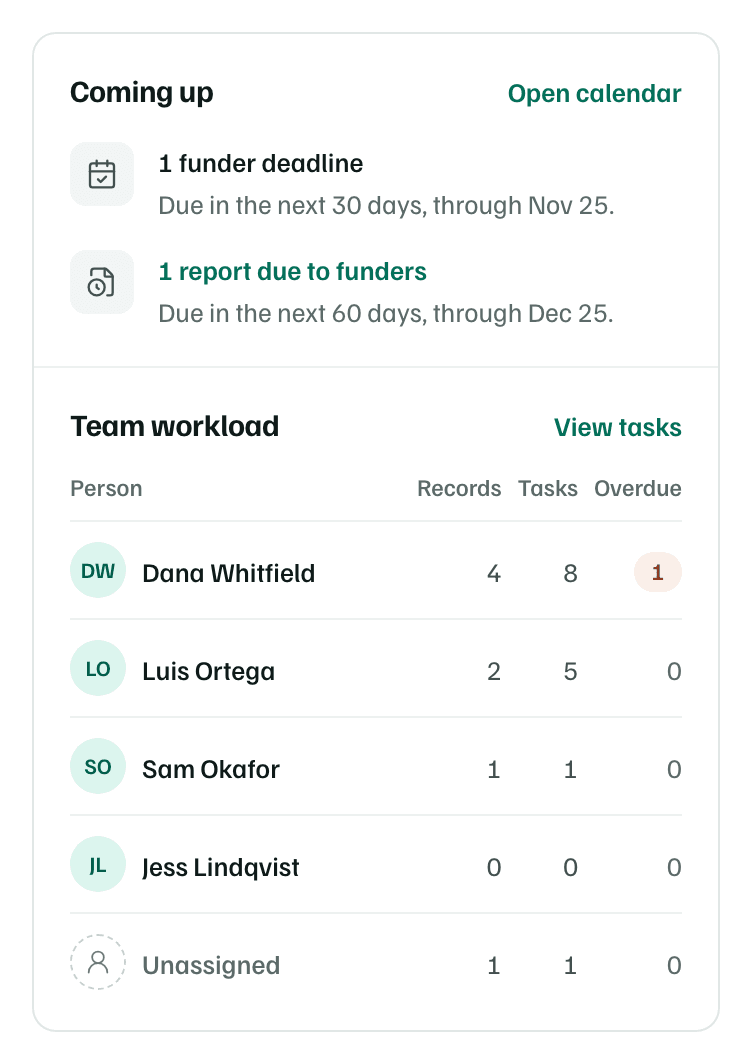
- Coming up: funder deadlines due in the next 30 days, and reports due to funders in the next 60. Deadlines are letters of inquiry, applications, reports, renewals and other dates your team must meet, on records that aren't closed. A decision date or a funder's event doesn't count. Overdue reports show as past due.
- Team workload: for each member, the open records they own, their open tasks and how many are overdue. Unassigned gathers work nobody owns, and No longer in the workspace gathers work owned by people who left.
Tip