Subscribe from Google, Apple or Outlook
Create a private calendar link to see this workspace's dates in Google Calendar, Apple Calendar or Outlook. It keeps up as dates change here. You can also download a one-time copy.
- 3 min
- Every plan
Screens from October 2026
In the app:Calendar, then Subscribe
Open Subscribe
On the calendar, select Subscribe. The same link is in Settings › Notifications, under Calendar subscription.
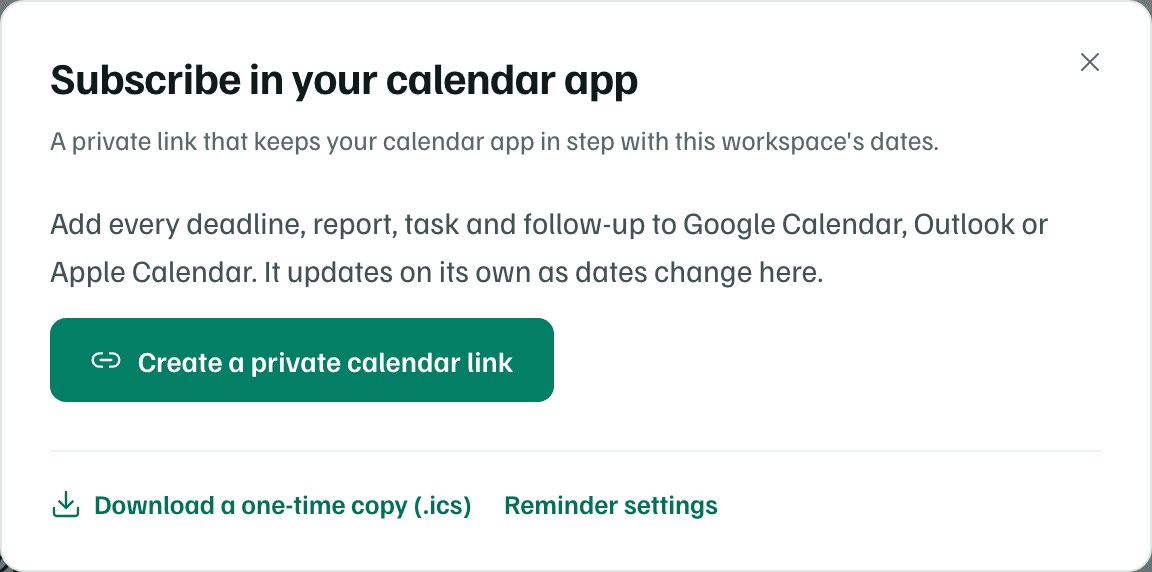
Example workspace · fictional data Create your link
Select Create a private calendar link. The dialog shows Your private calendar link with Copy link, Add to Google Calendar and Open in Apple Calendar or Outlook.
Add it to your calendar app
Select the button for your app, or copy the link and add it by hand as the table below shows.
| Calendar app | Steps |
|---|---|
| Google Calendar | On a computer, open Other calendars → + → From URL, paste the link and choose Add calendar. |
| Outlook | Choose Add calendar → Subscribe from web, paste the link, name it and choose Import. |
| Apple Calendar | On a Mac, choose File → New Calendar Subscription and paste the link. On iPhone, open Settings → Calendar → Accounts → Add Subscribed Calendar. |
Calendar apps check for changes on their own schedule, from every few minutes to once a day, so a new date can take a while to appear.
What the link shows
- Every date on the workspace's calendar, from about three months back to about 18 months ahead, in a calendar named after the workspace.
- Dates are all-day events. A funder's stated time becomes a timed event.
- Each event's notes say which record it belongs to, how sure the date is and who owns it, with a link that opens it in GrantFlex.
- Estimated dates are marked tentative, and no event blocks time in your calendar.
The link is yours alone. Each person makes their own, in each workspace.
Keep this link private
Reset or turn off the link
Once you have a link, two buttons appear below it. Each asks you to confirm first.
- Reset link makes a new link. The old one stops working, so add the new one to your calendar app. Use it if the link was shared by mistake.
- Turn off link removes it. Calendars subscribed to it stop updating.
Download a one-time copy
In the Subscribe dialog, select Download a one-time copy (.ics). You get a file named grantflex.ics with the same dates. Import it into any calendar app. It doesn't update, so download it again when dates change.
